
Manage products, prices and stock from the POS
Update stock, prices, barcodes and cost of goods without leaving the till.
The choPOS Products screen lets managers change WooCommerce stock levels, regular and sale prices, barcodes and cost of goods right from the POS. Changes are saved to WooCommerce immediately, so the online shop and the till always show the same stock and prices.
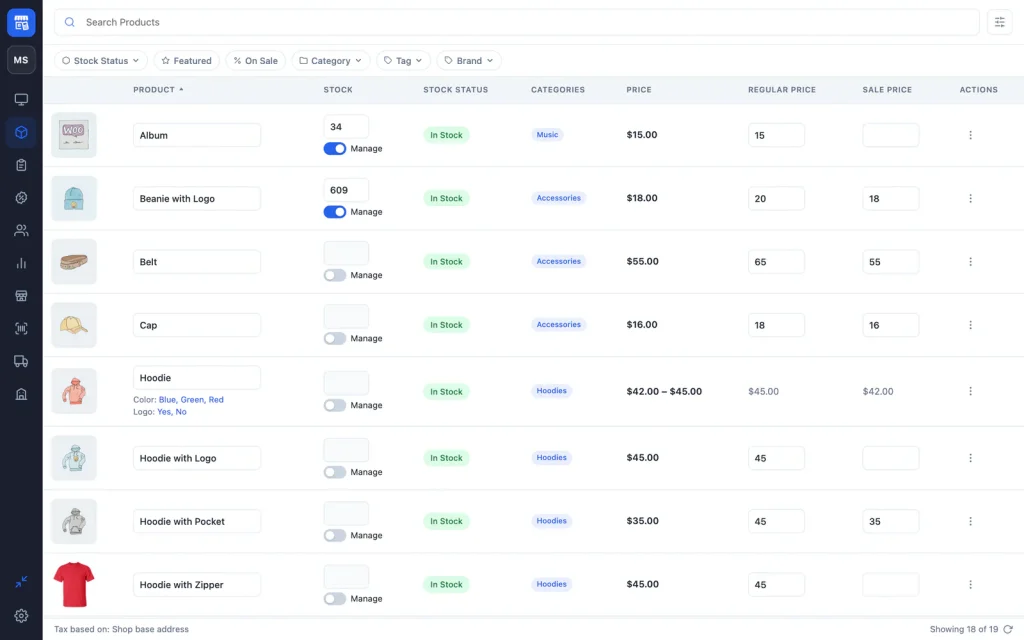
Open the Products screen
Click Products (the box icon) in the sidebar. Search with Search Products, or filter by Stock Status (In Stock, Out of Stock, On Backorder), Featured, On Sale, Category, Tag or Brand. Click a column heading to sort by ID, name, price or date. The screen shows up to 100 products at a time, so use search and filters in large catalogues.
Edit stock and prices inline
- Turn on Manage to track stock for a product, then type the Stock quantity.
- Type a new Regular Price or Sale Price. Variable products show their price range; change each variation in WooCommerce.
- Edit the product name, Barcode and Cost of Goods Sold columns the same way. Turn on extra columns, such as SKU, Barcode, Tags and Date, from the settings button.
Edit a product in full
Choose Edit from a product’s menu to change its name, categories, SKU, barcode, prices, status (Publish, Draft, Pending, Private), stock quantity, featured, virtual and downloadable flags, Manage Stock, tax class and tax status. Images, descriptions, attributes and variations are edited in WooCommerce.
To add a product, use Products → Add New in WooCommerce; it appears in choPOS straight away.
Barcodes and cost of goods
The Barcode field is what a barcode scanner matches when the SKU does not. If it is empty, the SKU is used. Cost of goods uses WooCommerce’s built-in Cost of Goods Sold when it is enabled, and a choPOS field otherwise. choPOS Pro can update cost prices from purchase orders and create barcodes for products that have none.
Who can edit products
Editing and deleting products needs WooCommerce’s manage_woocommerce capability, which Administrators and Shop Managers have. Deleted products go to the WooCommerce trash.
Running more than one location? With choPOS Pro, each extra store keeps its own stock, set from this same screen while you are working in that store.