
Sales reports in choPOS
Totals, taxes, payment methods and cashier totals for any date range, ready to print.
choPOS Reports shows sales for any date range: total orders, net sales, tax collected, total sales, discounts, totals by payment method, tax and cashier, items sold and average order value. A chart shows sales by hour, day or month, and the summary can be printed. Filter by status, customer, cashier, channel or store.
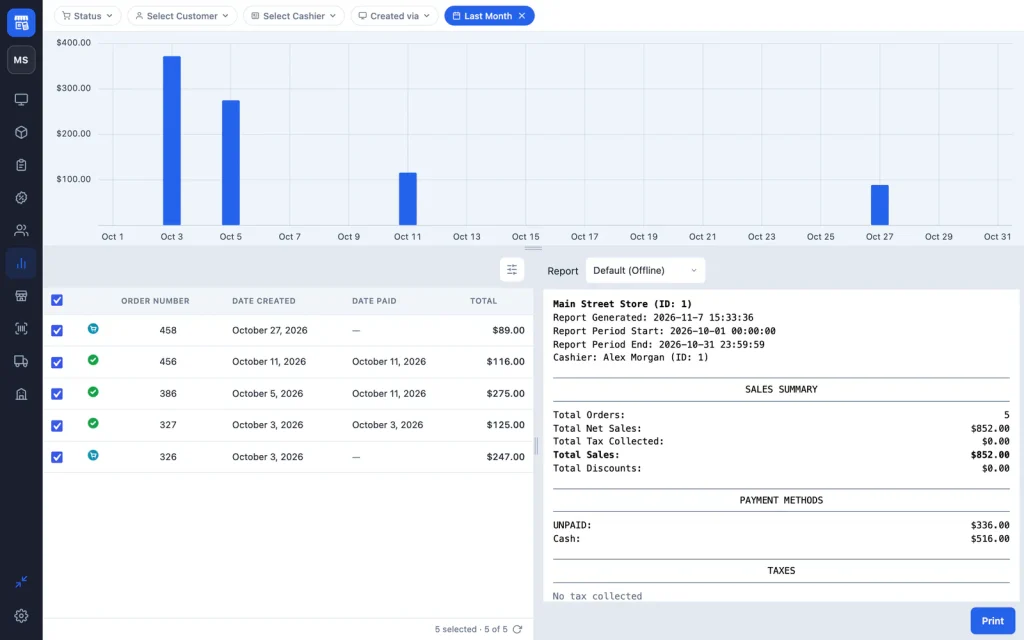
Open Reports
Click Reports in the sidebar, or go to choPOS → Reports in WordPress. Reports opens on today. Staff need the chopos_view_reports capability or manager rights (see Staff roles).
Choose what to include
- Date Range: a preset such as Yesterday, This Week or Last Month, or dates from the calendar.
- Status, Select Customer and Select Cashier.
- Created via: choose POS for counter sales only, or Checkout for online orders.
- Untick any order in the list to leave it out of the totals.
The chart
The bar chart shows each period’s sales split into net and tax: by hour for a single day, by day for up to about two months, and by month for longer ranges. Hover over a bar to see the total, tax and number of orders. Drag the bottom edge to make the chart taller.
The sales summary
| Section | Shows |
|---|---|
| Sales Summary | Total orders, total net sales, total tax collected, total sales and total discounts. |
| Payment Methods | Totals for each payment method. Unpaid amounts are listed as UNPAID. |
| Taxes | Tax collected for each tax rate. |
| Cashier and store totals | Number of orders and sales for each cashier and store. |
| Additional Info | Items sold and average order value. |
Click Print to print the summary, for example at the end of the day. Reports include up to the newest 2,000 orders in the range; narrow the dates if you see a notice.
Totals are based on order totals and do not subtract refunds. Filter by Status to leave refunded orders out.
Reports per store (Pro)
With choPOS Pro, reports open for the store you are working in, and the Created via menu has a Store section to switch to another store.